
A quick note before we start: a few weeks ago I published a post on this blog walking through the BizTalkMigrationStarter community toolkit and how to wire it up as an MCP server via VS Code AI Toolkit and Microsoft Foundry. It was accurate at the time and the toolkit itself is still very much functional. But while cross-checking against the Azure Logic Apps Live April 2026 Community Call, I spotted something I had missed: Microsoft quietly published an official VS Code extension on the Azure GitHub org that fundamentally changes the picture. This post is about that tool — and why it should now be your first stop for BizTalk migration.
🔄 What Changed — And Why It Matters
The BizTalkMigrationStarter MCP server (by Harold Campos, community MVP) was the first publicly available AI-assisted migration toolkit and it earned its place in the February 2026 Microsoft Community Hub spotlight. It remains a great option if you want a fully open MCP server you can wire to Claude Desktop or customise deeply.
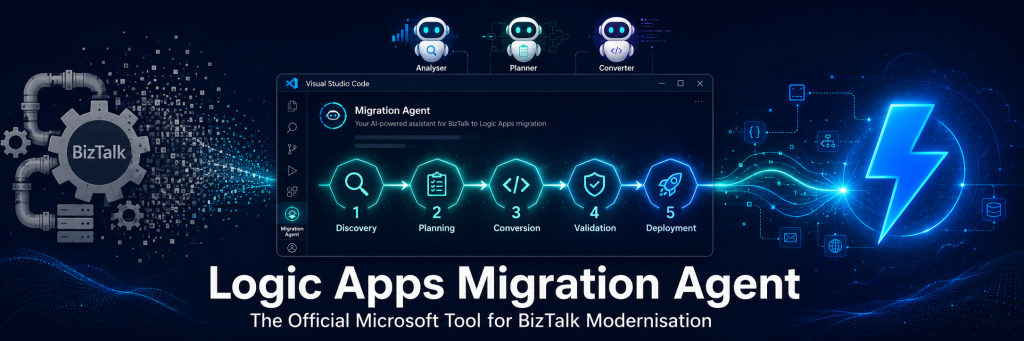
But in parallel, the same Harold Campos — together with Dyvia and the Azure Logic Apps product team — shipped something more complete: the Logic Apps Migration Agent, a native VS Code extension published directly under the Azure GitHub organisation. The May 2026 Logic Apps Aviators Newsletter captured the community reaction perfectly: “I don’t need to wish for one — you guys have already created it: Logic Apps Migration Assistant Agents. That stuff is definitely magic.”
This is not a community side project any more. It is the official Microsoft migration tooling for BizTalk → Logic Apps Standard, and it is built directly into your VS Code workflow with no MCP configuration, no Agent Builder wiring, and no dotnet build required.
📌 Azure/logicapps-migration-agent — GitHub
The BizTalk End-of-Life Context (Still Very Much Real)
Nothing has changed on the urgency front. BizTalk Server 2020 has mainstream support until April 2028, paid extended support until April 2030 — and that is the absolute end of the line. BizTalk Server 2016 is already out of mainstream support today. And now, on top of that: Azure Service Bus will retire the Service Bus Messaging Protocol (SBMP) on September 30, 2026, which directly impacts BizTalk Server 2020 customers who rely on the Service Bus adapter. That is an even sooner and more concrete forcing function than the BizTalk EOL itself.
Microsoft has been unambiguous: Logic Apps Standard, part of Azure Integration Services, is the designated successor — with 1,400+ connectors, native BRE support, hybrid Arc-enabled deployment, and the ability to convert orchestrations into agentic business processes.
📌 BizTalk Server Lifecycle Update — Microsoft Community Hub
Two Tools, One Goal — Understanding the Landscape
Before diving into the official extension, it is worth understanding how the two tools relate. They share DNA — Harold Campos contributed to both — but they are positioned differently:
| BizTalkMigrationStarter (community) | Logic Apps Migration Agent (official) | |
|---|---|---|
| Owner | Harold Campos — community MVP | Microsoft Azure org — official product |
| Delivery | .NET CLI tools + standalone MCP server | Native VS Code Extension (Activity Bar) |
| AI integration | External MCP wired to Claude / Copilot via mcp.json | Built-in — uses VS Code Language Model API with 3 native Copilot agents |
| Source platforms | BizTalk only | BizTalk + MuleSoft (stub) + extensible plugin system |
| Workflow | Conversational / free-form via agent prompts | Structured 5-stage pipeline: Discovery → Planning → Conversion → Validation → Deployment |
| Visualisation | HTML/Markdown reports | Interactive architecture diagrams, message flow graphs, dependency maps |
| Deployment | Manual Bicep / GitHub Actions | Direct to Azure from Stage 5 within the extension |
| Setup effort | Clone, build, configure mcp.json, wire Agent Builder | Install from VS Code Marketplace, open folder, click icon |
| Best for | Claude Desktop users, deep customisation, open MCP ecosystem | Teams already in VS Code + Copilot, enterprise rollouts, guided structured migration |
Both are legitimate choices. For most enterprise teams who live in VS Code with GitHub Copilot, the official extension is the clear first path. For teams who want Claude Desktop or fully custom MCP agent behaviour, the BizTalkMigrationStarter MCP server remains excellent. Think of them as complementary, not competing.
Inside the Logic Apps Migration Agent
Three Specialised Copilot Agents
Rather than a single general-purpose agent, the extension ships three purpose-built Copilot agents, each owning a specific phase of the migration lifecycle:
| Agent | Role |
|---|---|
@migration-analyser | Scans your BizTalk project, builds an artifact inventory and dependency graph, produces complexity scoring and gap analysis. This is your starting point. |
@migration-planner | Takes the analyser output and generates a per-flow migration plan with action mappings, Logic Apps pattern equivalents, and effort estimates. Produces the roadmap your team actually needs. |
@migration-converter | Executes the task plans — converts orchestrations (.odx), maps (.btm), pipelines (.btp), bindings (.xml) into Logic Apps Standard artifacts. Generates workflow JSON, connection configs, and supporting files. |
The 5-Stage Migration Pipeline
The extension enforces a structured workflow you cannot skip stages in. This is by design — it prevents the classic mistake of jumping straight to conversion without understanding the complexity first:
| # | Stage | What happens |
|---|---|---|
| 1 | Discovery | Auto-detects platform, scans files, builds a full artifact inventory and dependency graph. Supports BizTalk (2016, 2020) and MuleSoft (stub, more platforms via plugin). |
| 2 | Planning | @migration-planner analyses complexity, maps source patterns to Logic Apps equivalents, generates per-flow migration plans with effort estimates and gap analysis. |
| 3 | Conversion | @migration-converter executes the plans — produces Logic Apps Standard workflow JSON, connection files, and supporting assets. Unsupported shapes are flagged explicitly, never silently dropped. |
| 4 | Validation | Tests generated workflows and validates behaviour against source specifications before anything touches Azure. |
| 5 | Deployment | Deploys the generated Logic Apps artifacts directly to your Azure subscription from within VS Code. |
Step-by-Step: Getting Started
Prerequisites
- VS Code (latest stable)
- GitHub Copilot subscription (the extension uses VS Code Language Model API — no separate AI config needed)
- An Azure subscription for deployment (Stage 5 only)
- Your BizTalk artifacts:
.odx,.btm,.btp, andBindingInfo.xml
Step 1 — Export Your BizTalk Artifacts
Open BizTalk Server Administration Console. Navigate to your application:
- Right-click application → Export → MSI file to get your
.odx,.btm, and.btpfiles from the unpacked MSI. - Right-click application → Export → Bindings → save as
BindingInfo.xml. Multiple orchestrations can share one binding file.
Put everything in a single folder, e.g. C:\BizTalk\MyApp\Artifacts. Open that folder in VS Code as your workspace.
Step 2 — Install the Extension
Open VS Code → Extensions (Ctrl+Shift+X) → search “Logic Apps Migration Agent” → Install. Alternatively, clone the repo and install from VSIX for the latest unreleased build:
git clone https://github.com/Azure/logicapps-migration-agent.git
cd logicapps-migration-agent
npm install
npm run build
# Then: VS Code → Extensions → Install from VSIX → select the generated .vsix
Once installed, the Logic Apps Migration Agent icon appears in the VS Code Activity Bar.
Step 3 — Select Your Source Folder and Start Discovery
Click the Migration Agent icon in the Activity Bar. When prompted, select your BizTalk artifacts folder (or use Command Palette: Logic Apps Migration Agent: Select Source Folder).
The extension auto-detects the platform (BizTalk 2016/2020 in this case), scans all files, and builds an artifact inventory with a dependency graph. You will see this rendered as an interactive diagram directly in VS Code — orchestrations, their receive/send port dependencies, map references, and pipeline linkages, all visible before you touch a single line of conversion.
Step 4 — Planning with @migration-planner
Stage 2 hands off to the @migration-planner Copilot agent. Open the Copilot Chat panel and engage it:
@migration-planner Analyse the discovery results and generate a migration
roadmap for MyApp. Flag any high-complexity orchestrations and adapters
that will need manual remediation.
The planner produces per-flow migration plans — each one containing: the BizTalk pattern detected, the Logic Apps Standard equivalent, required connectors, effort estimate (S/M/L/XL), and any gap items needing human design decisions. This is the document your project manager actually needs to scope the migration engagement.
Step 5 — Conversion with @migration-converter
Once you review and approve the plan, hand it to the converter:
@migration-converter Execute the migration plan for OrderProcessing flow.
Target: Cloud deployment. Generate the complete Logic Apps Standard package.
The converter processes your .odx + BindingInfo.xml, maps every orchestration shape to its Logic Apps equivalent, translates .btm maps to Logic Apps Mapping Language (.lml), and converts .btp pipelines to workflow actions. The key shape mappings:
| BizTalk Shape | Logic Apps Standard Equivalent |
|---|---|
| Receive Shape | Trigger (HTTP, Service Bus, etc.) |
| Send Shape | Connector Action (HTTP, Service Bus Send) |
| Decide Shape | Condition / Switch action |
| Parallel Actions | Parallel Branch |
| Loop Shape | Until / For Each |
| Scope + Compensation | Scope with Run After error handling |
| Call Orchestration | Child Workflow (HTTP Request trigger) |
| Self-Recursion | Auto-converted to Loop |
Step 6 — Validation
Stage 4 runs validation against the generated workflows — catching connector misconfigurations, missing schema references, and deployment blockers before anything reaches Azure. Validation errors surface inline in VS Code with suggested fixes. Iterate here until the validator is clean.
Step 7 — Deploy Directly to Azure
Stage 5 deploys the generated Logic Apps Standard package directly to your Azure subscription from within VS Code. Sign in to Azure via the extension, select your subscription and resource group, and deploy. The extension configures the Logic Apps Standard (Workflow Service Plan) resource — the correct tier for BizTalk migration scenarios involving stateful workflows, long-running transactions, and message correlation.
The Extensible Plugin System — Future-Proofing Your Toolchain
One architectural decision in the official extension that deserves highlighting: the Parser Plugin System. Platform support is contributed via VS Code extensions rather than being baked into the core tool. BizTalk has a built-in parser. MuleSoft has a stub parser already in progress. Any partner or ISV can contribute a new platform parser (IBM WebSphere, TIBCO, Boomi, etc.) via this plugin mechanism without forking the core extension.
For enterprise integration teams with multi-platform legacy estates — which is most large organisations — this means one tool, one workflow, and one learning curve regardless of whether you are migrating from BizTalk, MuleSoft, or something else entirely.
What Still Needs Human Judgment
No tool automates everything. These items are flagged by the extension but require human design decisions:
| BizTalk Feature | Recommended Path |
|---|---|
| Custom pipeline components | Rewrite as Azure Functions; wire via custom connector or local function |
| BAM (Business Activity Monitoring) | Redesign with Application Insights + custom tracking actions |
| BRE (Business Rules Engine) policies | Logic Apps Rules Engine (same BRE runtime!) or Azure Functions for complex logic |
| EDI / AS2 | Logic Apps Standard has native EDI — but requires manual partner agreement configuration in an Integration Account |
| SSO (Enterprise Single Sign-On) | Replace with Azure Key Vault + Managed Identity |
| WCF-NetNamedPipe / MSDTC transactions | No direct equivalent — redesign using Azure Relay / Saga-compensation pattern |
| SBMP-based Service Bus adapter | ⚠️ Urgent: SBMP retires September 30, 2026 — migrate to AMQP-based Service Bus connector now |
Phased Migration Strategy — Still the Right Approach
The tool does not change the recommended migration strategy — incremental waves remain the right approach for any non-trivial BizTalk estate:
- Wave 1 — PoC: One low-complexity orchestration. Run all 5 stages end to end. Get familiar with the extension and validate your Azure target environment.
- Wave 2 — Pilot: A complete business process. Introduce Service Bus as the MessageBox replacement. Baseline monitoring in Application Insights.
- Wave 3 — Scale: Batch-convert the remaining estate using the planner’s effort estimates to sequence the work. Address manual remediation items per the gap analysis.
- Wave 4 — Decommission: Retire BizTalk infrastructure after a defined stabilisation period.
📌 Migration Approaches — Microsoft Learn
Official Reference Links
- 🛠️ Logic Apps Migration Agent — GitHub (Azure org)
- 🛠️ BizTalkMigrationStarter (MCP server / Claude alternative) — GitHub
- 📢 BizTalk Server Lifecycle Update — Microsoft Community Hub
- 📝 BizTalk Migration Tool (Harold Campos) — Microsoft Community Hub
- 📖 Why Move from BizTalk to Azure Logic Apps — Microsoft Learn
- 📖 BizTalk Migration Approaches — Microsoft Learn
- ▶️ Azure Logic Apps Live: April 2026 Community Call — YouTube
Closing Thoughts
The Logic Apps Migration Agent is what the BizTalk migration story has been missing: a structured, guided, AI-powered workflow that lives inside the tool integration teams already use every day. No new portals, no MCP configuration files, no additional infrastructure. Open your artifact folder in VS Code, invoke the extension, and walk through five stages that take you from BizTalk export to deployed Logic Apps Standard — with GitHub Copilot as your co-pilot at every step.
The SBMP retirement deadline of September 2026 makes this even more pressing for BizTalk 2020 customers specifically. If your BizTalk environment uses the Service Bus adapter, that migration is not optional — it is urgent. The extension gives you a structured path to address it without the chaos of an unplanned cutover.
And for teams who want more open control — wiring Claude Desktop, customising connector mappings, or running migration agents across multiple AI models — the BizTalkMigrationStarter MCP server remains a solid complementary tool. Both exist, both work, and knowing which one fits your context is half the battle.
Tried the official extension? Hit a gap or found a pattern it handles particularly well? Drop it in the comments — and feel free to contribute a platform parser if you are sitting on a MuleSoft or TIBCO estate that needs the same treatment.